
WGBS Analysis Part 23
methylKit with R Studio server on mox
TL;DR I can run calculateDiffMeth and get DML! Please enjoy this saga of troubleshooting and not reading errors properly.
Alas, after running for five hours my R SLURM script failed cries. When I looked at the SLURM output, I saw the following error:

calculateDiffMeth was giving me problems again! I posted this discussion to get input from Sam and Steven about what to do next.
Revisiting the build node
In the meantime, I decided to revisit the build node. I requested a build node and loaded R:
srun -p build --time=4:00:00 --mem=10G --pty /bin/bash #Request a build node for four hours
module load r_3.6.0 #Load R version 3.6.0
R #Start R
I loaded my R data and ran calculateDiffMeth without a covariate matrix or overdispersion correction. It finished running and I ran warnings(). They were all glm.fit errors, which I’ve encountered before. I was able to produce a methylDiff object, so that’s a good sign!


I then tried running calculateDiffMeth with the covariate matrix and overdispersion correction. Around the four hour mark, my command timed out. I initially thought it was related to calculateDiffMeth, but I then I realized it was probably because the four hour reservation ended! In any case, it was ready for me to move onto a different option: R Studio server.
Troubleshooting R Studio server
When I started running calculateDiffMeth on the build node, I also started working through the R Studio server Sam set up on mox. I followed the instructions he laid out in this discussion. To run R Studio server, I needed to change my R library directory information in ~/.Renviron, then run a SLURM script to get R Studio login credentials. I could then tunnel into mox in a separate Terminal window to run R Studio.
When I went to change my ~/.Renviron library location, I realized I didn’t have a ~/.Renviron file to begin with! Sam said I should make one, so I did.

I created this script to get R Studio log in credentials. After running it, I was unable to tunnel into mox and access the R Studio server! I posted this discussion with the specific “connection refused” error I got:
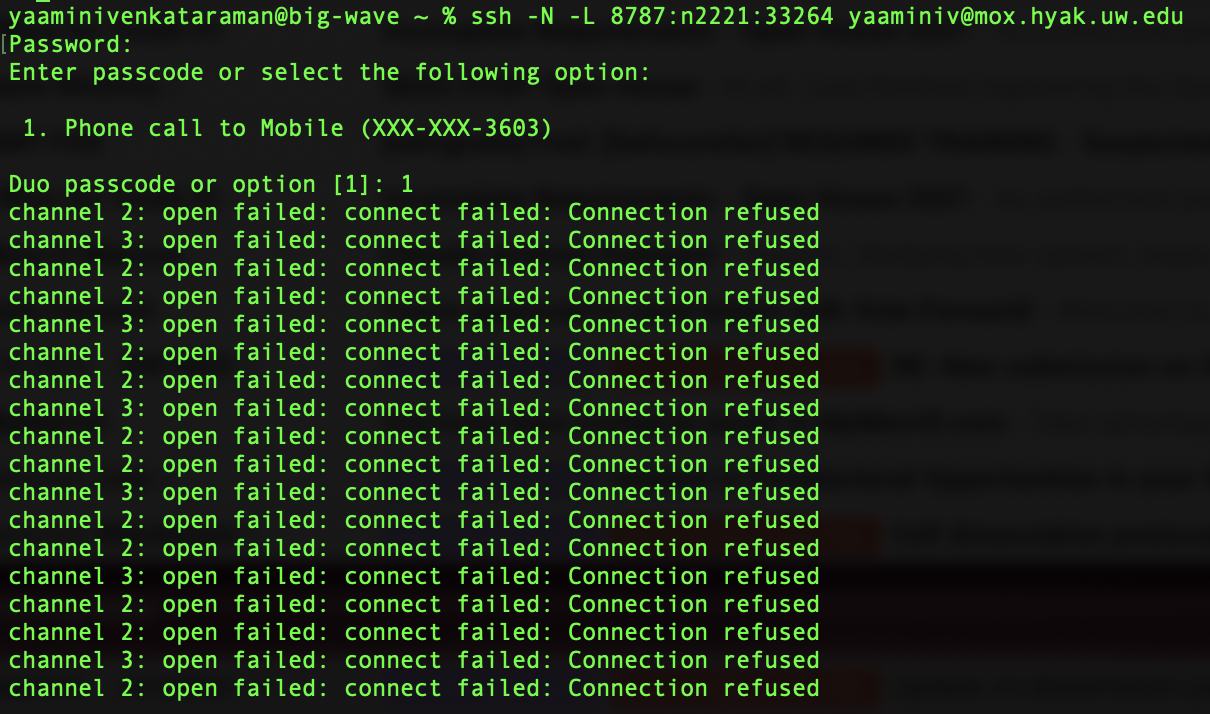
Turns out I misinterpreted Sam’s original script, and didn’t include any of the important things that started the R Studio server session! I added the script sections I needed to, then ran it again and was able to access R Studio server. I found my R Script and started running calculateDiffMeth. According to Sam, the session should still run even if I close the window.
Later at night, I decided to test that theory. When I closed the R Studio server browser on my local machine, I got an error in my Terminal window. I logged back into R Studio server on genefish, I saw the following error:

It seemed like calculateDiffMeth finished running, but there was an “error writing to connection” that I didn’t understand. I set up calculateDiffMeth to run through the night. I saw that I was logged out after 60 minutes due to inactivity. When I logged back in, I saw a slew of error messages:

There were 50 or more warnings (use warnings() to see the first 50): Checked warnings(), they’re glm.fit errors (not related to the issue at hand). At least I knowcalculateDiffMethran!

-
Error in h(simpleError(msg, call)) :
  error in evaluating the argument 'x' in selecting a method for function 'head': object 'differentialMethylationStatsTreatment' not found
: My fault, didn’t reference the correct data frame. When I referenced the correctcalculateDiffMethoutput, the command worked! -
Same
error writing to connectionerror! However, it mycalculateDiffMethcommand DID finished running, and my global environment was loaded again when I logged back into the R Studio server.
Sam investigated it further and saw that my home directory may be full, leading to errors saving any R Studio output, like ~/.rstudio or ~/.Rdata in that directory. I was saving my R data in /gscratch/scrubbed/yaaminiv/Manchester/analyses/methylKit, but it’s possible that the large methylKit objects were causing resulting in a ~/.rstudio file. Interestingly, my global environment was loading each time I logged into the R Studio server. I checked my login node quota and ruled out that it was a storage issue on my end! Since the R Studio server was still working for me and I was able to save output to my scrubbed directory, I kept going.
The bottom line
The force termination was likely because the build node timed out because I only requested one for four hours, and the head command error was because I was incorrectly calling the dataframe. Thanks to R Studio server, I could confirm that this was the case and ensure that the warnings were not devastating! I updated my “connection refused” discussion with explanations of my error messages, and posted an update in my original discussion about calculateDiffMeth.
But the best part was that I ran getMethylDiff AND I HAVE DML! I’ll post about that in a separate notebook entry.
So really, it was a typo all along.
Going forward
- Finish running
methylKiton R Studio server - Write methods
- Write results
- Update
moxhandbook with R information - Obtain relatedness matrix and SNPs with EpiDiverse/snp
- Identify genomic location of DML
- Determine if RNA should be extracted
- Determine if larval DNA/RNA should be extracted